
Code Complaints
Report potential breaches of the code
Notice: Temporary Closure of the ACPDM Complaints Facility
Due to current staffing constraints, the Complaints Facility under the Australian Code of Practice on Disinformation and Misinformation (ACPDM) is temporarily closed.
The Facility is expected to reopen in November 2026. We apologise for any inconvenience this may cause and appreciate your patience during this period.
If you have a complaint you wish to raise once the Facility reopens, please check back on this page for updates, or make a complaint to the Code signatories via the complaint tools on their websites.
Complaints
DIGI will not be able to accept complaints about individual items of content on signatories’ products or services, which should be directed to the signatory via their reporting mechanisms or otherwise. We have included general information about how to report content on signatories’ services below, however often the ability to report content exists on the URL where you are viewing it.
Adobe
Users may report violations of Adobe’s Terms of Use or Community Guidelines, including mis- and dis- information on Adobe products and services, by following the product-specific directions contained on this page. For any products and services not listed in this page, users may reach out to abuse@adobe.com to file a report with Adobe’s Trust & Safety team.
Apple news
To report a concern:
1. While in a story, tap the More Actions button. On your Mac, click the Share button.
2. Tap or click Report a Concern.
3. Choose a reason that you don’t want to see the story and provide more details.
4. Tap or click Send.
Meta
Meta’s Australian third-party fact-checking partners are also able to receive referrals from the public by contacting them directly:
Microsoft
- Microsoft Bing: Report a Concern
- Microsoft Start: users can find a feedback form by selecting “feedback” in the settings menu on the Start landing page.
- Microsoft Advertising: Low quality ad submission & escalation – Microsoft Advertising
- LinkedIn: members can report concerns using the in-product reporting mechanism represented by the three dots in the upper right-hand corner of a post on LinkedIn.
Redbubble
TikTok
- Go to the video they wish to report.
- Press and hold on the video.
- Select Report and follow the instructions provided.
Users can also use this online form to report content on TikTok.
Twitch
To report a Channel
- Click the 3 Vertical Dots icon in the bottom right below the video player on the channel to report the live stream itself (using Report Live Stream) or other attributes of the user such as their username or their avatar (using Report Something Else).
- You can also initiate a report for a user’s chat messages or Whispers under the Report Something Else menu, but we recommend reporting directly from the chat message or the Whisper so that our team knows exactly what message you are reporting.
- Clicking on either Report Live Stream or Report Something Else will open the reporting flow.
- Follow the report flow to select the most appropriate category for your report and write a detailed description of the violation in the Tell Us More field. If the correct category isn’t listed on the first page of the form, you can select Search in order to search for the reason category.
Make a complaint
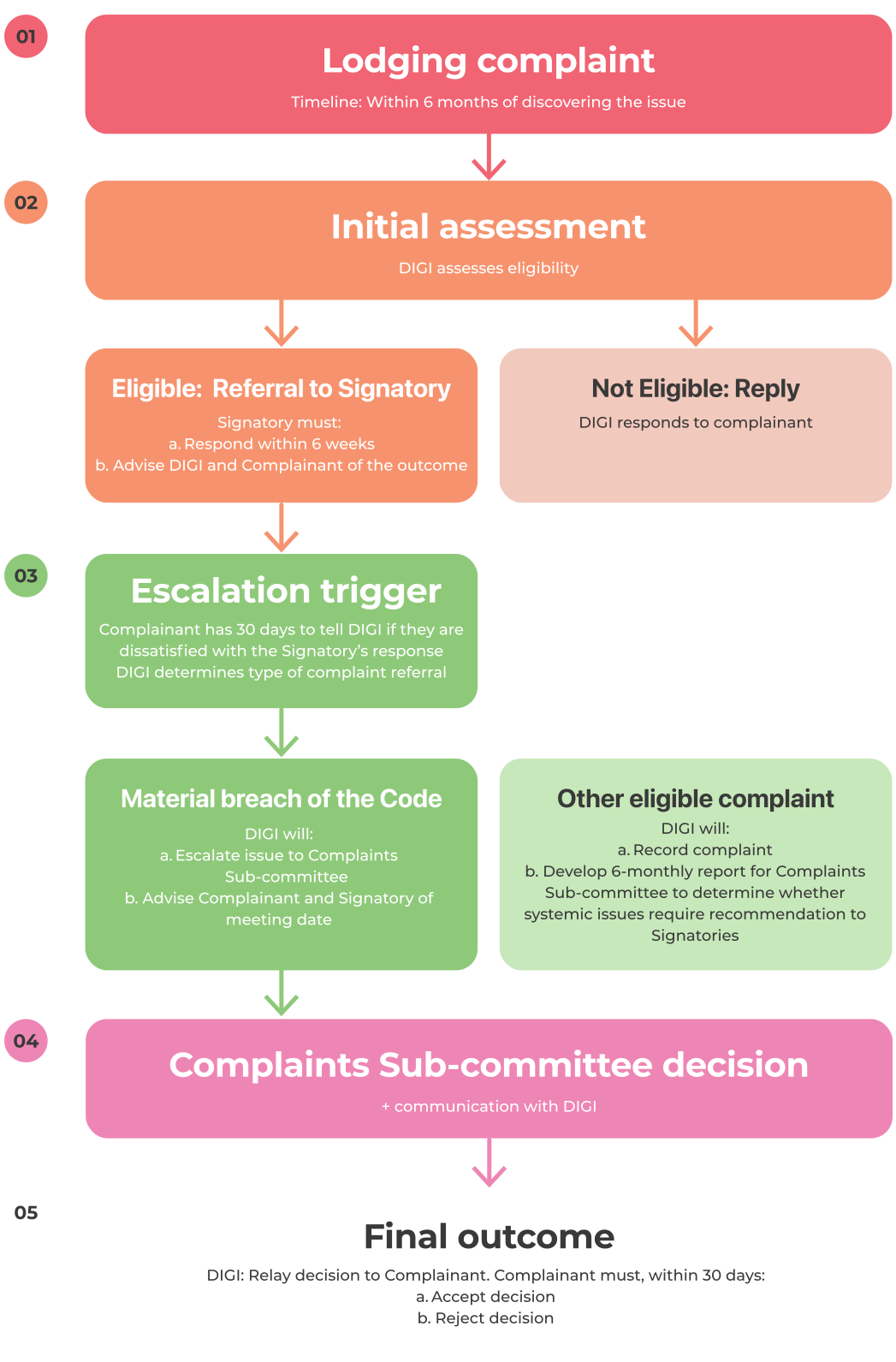
Complaints are referred to an independent committee for review.
Step-by-Step Guide to making a complaint:

Check if your concern is within scope.
Read the terms of the complaints facility to see if your report is eligible for review by the independent complaints sub-committee.

Gather necessary info.

Submit via form
Send this information to DIGI via the form below. Eligible complaints will then be referred to the independent sub-committee for review.
DIGI Complaint Process
Complaint Process
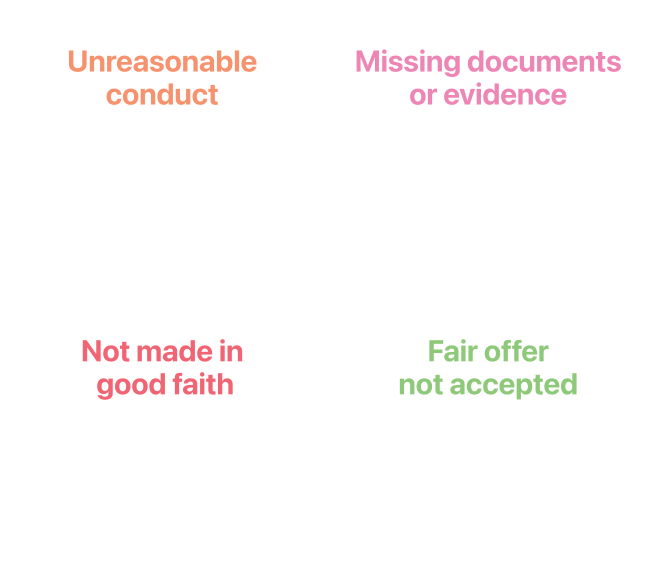
When DIGI May Stop Handling a Complaint
FREQUENTLY ASKED QUESTIONS
What happens if a signatory is found to be in breach of the code?
The Complaints Sub-committee can decide the resolution of a complaint about potential material breaches of the Code based on the severity of the breach, taking steps that range from public statements, investigations and withdrawing a company from the code. However, the aim of the complaints facility is to actually resolve the complaints, so as to have a positive impact on mis- and disinformation in Australia; this will involve working constructively with signatories on the steps they can take to improve compliance with their code commitments.
Why can’t people make complaints about specific pieces of misinformation and disinformation content to DIGI?
The aim of the code is to drive improvements and transparency on the measures that signatories take to deal with misinformation and disinformation in Australia. The complaints facility’s approach is consistent with that aim. DIGI will accept complaints from the Australian public where they believe a signatory has materially breached the code’s commitments. Complaints about individual items of content on signatories’ products or services should be directed to the signatory via their reporting mechanisms or otherwise. The code requires all signatories to have such reporting mechanisms.
What structures have you put into place to prevent conflicts of interest for DIGI in this governance arrangement?
Self-regulatory codes of practice developed by industry associations are used in a range of industries, including the media, advertising and telecommunications. DIGI’s handling of complaints is oversighted by the independent Complaints Sub-committee. As the code developer, DIGI acts as secretary on this Complaints Sub-Committee, but has no vote on decisions regarding complaints brought to it, in order to avoid conflicts of interest as an industry association.
How will the independent attestation of the transparency reports be undertaken?
The independent reviewer will verify claims in each signatory’s transparency report going forward, including whether they have published and implemented policies and processes that comply with their obligations, and verifying that those initiatives are accessible to Australia users. If the independent reviewer can’t attest a claim, it advises the Administration Sub-committee comprised of independent representatives and signatories. The signatory must either amend and resubmit the reports to the reviewer for further assessment or provide written reasons as to why they dispute the reviewer’s assessment, which would be published with their transparency reports on the DIGI website.
MORE INFO
Get in touch
The code is open to any company in the digital industry as a blueprint for best practice for how to combat mis and disinformation online. If you are interested in adopting the code, please contact us at hello@digi.org.au.
